
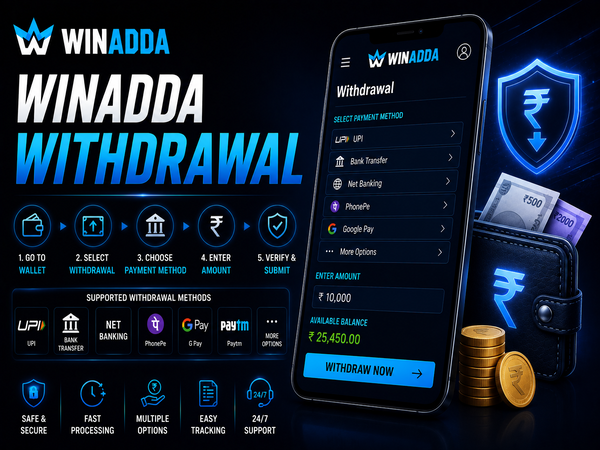
Winadda Withdrawal
A Winadda allows eligible users to transfer available funds from their account to a supported payment method. Before submitting a request, it is important to verify your account information, payment details and available balance to help avoid unnecessary delays.
Withdrawal requests are processed according to the payment option selected and the information provided in your account. Following the correct process and using official Winadda channels can help ensure a smoother withdrawal experience.
Before You Submit a Withdrawal Request
A few quick checks before requesting a withdrawal can help your transaction proceed more smoothly.
Make sure you have:
- Sufficient available wallet balance
- Correct bank account or UPI details
- An active Winadda ID
- Completed any required account verification
- No pending withdrawal requests
Reviewing these details beforehand helps reduce the likelihood of delays caused by incorrect information.
Your Winadda Withdrawal Journey
Every withdrawal follows a simple process from request to completion. Understanding each stage makes it easier to track the progress of your transaction.
| Stage | What Happens |
|---|---|
|
📝
Submit Request
|
Enter the withdrawal amount, select the available payment method and confirm your request. |
|
🔍
Verification
|
Your account information, withdrawal details and selected payment information are reviewed. |
|
⚙️
Processing
|
The approved withdrawal request is prepared for transfer to the selected payment method. |
|
✓
Completion
|
The funds are sent to the payment method selected during the withdrawal request. |
The status of your withdrawal may change as it moves through each stage. Processing time can depend on account verification, payment method availability and transaction review.
Withdrawal Methods Available on Winadda
Depending on your account, Winadda may support different withdrawal options. Available methods can vary based on account eligibility, payment availability and current platform instructions.
| Method | Description |
|---|---|
|
📱
UPI
|
Withdraw funds to a supported UPI account linked to the correct account holder details. |
|
🏦
Bank Transfer
|
Request a direct transfer to a registered bank account using the payment details available in your account. |
|
💳
Other Supported Methods
|
Additional withdrawal options may appear depending on your account availability and currently supported payment methods. |
Always select the withdrawal method displayed inside your Winadda account. Verify the account number, UPI ID, beneficiary name and withdrawal amount carefully before submitting your request.
How Withdrawal Requests Are Processed
After a withdrawal request is submitted, it passes through several stages before the funds are transferred.
The review process may include:
- Verification of account information
- Confirmation of payment details
- Internal processing checks
- Transfer to the selected payment method
The overall processing time can vary depending on the payment option, banking network and account verification status.
Register/Singup To create Winadda Account
Why a Withdrawal May Take Longer
Most withdrawal requests are completed after processing, but some may require additional time.
Common reasons include:
- Incorrect payment details
- Account verification pending
- Banking network delays
- Public holidays or weekends
- High transaction volumes
Submitting another withdrawal request while one is already being processed is generally not recommended.
Need Help With a Withdrawal?
If your withdrawal has not reached your selected payment method, review your request and collect the necessary transaction information before contacting support.
Before Contacting Support
- ✓ Check the current status of your withdrawal request.
- ✓ Confirm that your payment details are accurate.
- ✓ Allow sufficient time for verification and processing.
- ✓ Keep your withdrawal or transaction reference ready.
Information to Provide
Providing complete and accurate information helps the support team identify your withdrawal request and review the issue more efficiently. Never share your password, OTP or banking PIN with anyone.
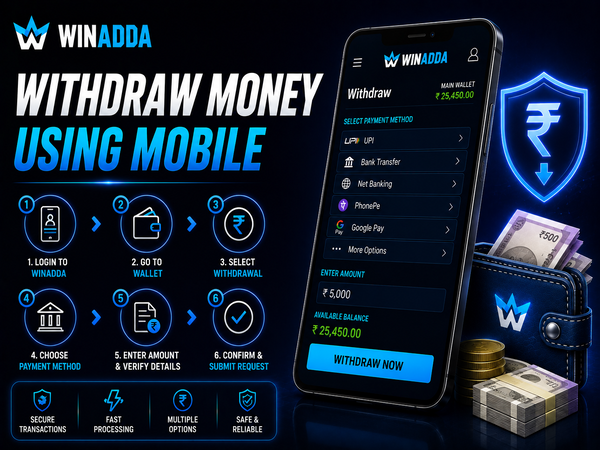
Withdraw Money Using Mobile
Winadda is compatible with supported mobile devices, allowing users to submit withdrawal requests from Android, iPhone or a mobile browser. Simply log in to your account, open the wallet section and follow the available withdrawal instructions.
Before confirming a request, review the withdrawal amount and payment details carefully. Using a stable internet connection can help prevent interruptions during the process.
Frequently Asked Questions
1. How do I withdraw money from Winadda?
Log in to your Winadda account, open the Withdrawal or Wallet section, choose an available withdrawal method, enter the amount and submit your request. You can monitor the withdrawal status from your account while it is being processed.
2. Which withdrawal methods are available on Winadda?
Depending on your account, withdrawals may be available through UPI, bank transfer or other supported payment methods displayed in your withdrawal section.
3. How long does a withdrawal take?
Processing time depends on factors such as the selected payment method, account verification and banking network. Some requests may take longer during weekends, holidays or periods of high transaction volume.
4. Why is my withdrawal still pending?
A withdrawal may remain pending if additional verification is required, payment details need confirmation or the banking network is experiencing delays. Check your withdrawal status before contacting support.
5. What should I do if I entered incorrect payment details?
If you notice incorrect information after submitting your request, contact Winadda customer support as soon as possible and provide your withdrawal details for assistance.
6. Can I cancel a withdrawal request?
Whether a withdrawal request can be cancelled depends on its processing status. Once processing has started, cancellation may no longer be possible. Contact customer support for guidance.
7. Is it safe to withdraw money from Winadda?
Users can improve account security by using official Winadda channels, verifying payment details before submission and protecting their login credentials at all times.
8. What information should I provide when contacting support?
Keep your Winadda ID, withdrawal amount, payment method, request date, reference number and any relevant transaction details ready to help the support team review your request efficiently.
9. Can I request multiple withdrawals at the same time?
It is generally advisable to wait until the current withdrawal request has been completed before submitting another request. This helps avoid confusion and allows you to track each transaction more easily.
10. Who can use the Winadda Withdrawal service?
Withdrawal services are intended for eligible Winadda account holders. Users should be 18 years of age or older and comply with the platform’s applicable terms and local regulations.
Complete Your Winadda Withdrawal with Confidence
Withdrawing funds from your Winadda account is straightforward when your account details are accurate and the correct withdrawal process is followed. Reviewing your payment information, monitoring your request status and using official Winadda support channels can help make the process smoother.
Whether you’re requesting your first withdrawal or managing regular transactions, always use verified payment details, keep your account secure and participate responsibly.
 Get Winadda ID Now